


3 Simple Ways to use Augmented Reality Weather Content Every Day
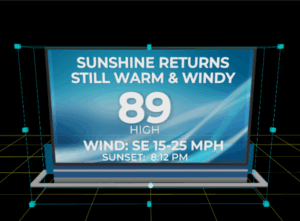
It’s no secret that I’m a big fan of augmented reality weather content. I was one of the first broadcast meteorologists to incorporate this dynamic, engaging storytelling tool into my daily weathercasts when I worked at KTRK, the ABC-owned station in Houston.
The original augmented reality software, Max Reality, was developed by The Weather Company*. This versatile software enables television stations to display 3D objects behind and in front of the broadcast meteorologist, creating an immersive presentation. Animating wind arrows come together to form a tornado, a car slides across the studio to demonstrate how ice affects stopping distance, and water rises above the floor to illustrate the impacts of flooding.
Most broadcast meteorologists immediately want to create these studio-size scenes when first introduced to the software. However, they quickly learn that something this complicated takes many hours to create and several minutes to animate on-air.
READ MORE > EXPLORING THE AUGMENTED WORLD OF MAX REALITY
However, not all Max Reality scenes need to be extravagant. I encourage my coaching clients to start small, using text-based data and 3D panels. While it might not be as exciting as a computer-generated tornado ripping through the studio, these no-frills scenes still grab viewers’ attention and emphasize critical information. Taking content that is usually part of a 2-D graphic and moving it into the 3D space can be an effective way to deliver The Essential Message.
These types of scenes are quicker to create and faster to playback on-air. They also allow production control to get used to coding the weather segment for augmented reality, and it enables the broadcast meteorologists to get used to choreographing their movements so the content displays correctly on-air.
Here are three simple ways local television stations can elevate their daily weather coverage with Max Reality using text-based weather content displayed over a simple panel that rises from a hatch in the floor or drops down from the ceiling above.
Weather Headlines
Communication research indicates that some viewers must read information to fully understand it. That’s why I encourage my coaching clients to incorporate limited amounts of text into the daily weather presentation.
A graphic that spells out three things viewers need to know and want to know about the weather can be a powerful communication tool. To maximize the impact of this information, use Max Reality to display weather headlines in front of a tower camera, radar, or other relevant data.

By the way, research also indicates that people tend to remember things in groups of three. More than four thoughts introduce confusion and uncertainty into the message. So, no more than three headlines. The exception might be for broadcast meteorologists who work for Channel 4, for obvious reasons.
Current Conditions
I don’t advocate showing the current conditions in every newscast. Viewers are only interested in the weather conditions where they live, and they can get the current temperature, wind, humidity, and other conditions on their smartphone without trying very hard. The exception would be morning newscasts and those days when the temperature is the weather story of the moment.
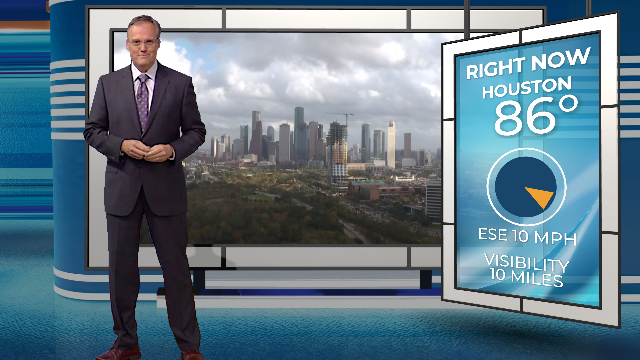
For those times, display the relevant information while showing the tower or traffic camera to explain how bad the visibility is, why viewers need to scrape frost off the car windshield before they hit the road, or why drivers need to hold on to the steering wheel with both hands.
Forecast Panels
In the 1970s and 1980s, TV stations usually displayed the forecast using text that spelled out what to expect for today, tonight, and tomorrow. Over the years, many broadcast meteorologists have moved away from these simple graphics, opting for forecast model data to show future weather conditions.

However, as I mentioned above, some viewers need the words. Max Sky, another data product from The Weather Company, elevates the traditional forecast by using model data to create realistic skyscapes that change over time. That, combined with text that explains critical weather information, turns the ordinary forecast panel into an extraordinary story.
Start small and build from there
Once broadcast meteorologists and production control have mastered executing augmented reality segments, it’s time to start thinking bigger! Debris could roll across the studio floor when the Weather Headlines mention gusty winds. A larger-than-life thermometer could show how high (or low) the temperature is. Realistic-looking raindrops and snowflakes could fall from above when precipitation is forecast.
In addition to text-based weather data, these little effects can elevate the daily weathercasts even more until the weather team is ready to tackle large-scale immersive presentations.
*HellerWeather has a marketing and training partnership with The Weather Company. If your weather team needs assistance designing and creating augmented reality weather content, Talk to Tim.
Tim Heller is an AMS Certified Broadcast Meteorologist, Talent Coach, and Weather Content Consultant. He helps local TV stations and broadcast meteorologists communicate more effectively and work more efficiently.